
Showing posts with label PC. Show all posts
Showing posts with label PC. Show all posts
Thursday, 31 October 2013
Boost the perfomance of your PC
No comments
:
Labels:
PC
,
tips
,
tricks
,
windows
,
windows 8.1
 If your are using a PC there is a high probability that your PC is suffering from some kind of performance trouble. The performance of your pc can be boosted by using some simple tricks and Softwares without effecting your OS. All the tricks below are 100 % working and will make sure
 your PC will stay alive even if you are running on 1 GB RAM.
Ccleaner
 Download it from here . The software is used to remove all the unused files from you system allowing your pc to run faster . It also deletes all of your online activity records such as history .You can also use it to customize start up programs on your computer .From the Tools options go to startup and disable all the programs that you don't use much often. Make sure you don't disable important ones like your antivirus. This action will prevent you from wasting too much RAM on background process.
Virtual memory
let me explain what is Virtual memory, Imagine a situation you are running a PC with 256 MB RAM.You want to run a video clip of size 500 MB . After filling up your RAM your computer stores it in a Virtual RAM in Hard disk and after execution of the loaded part the rest of the program is shifted from Hard disk to physical memory.
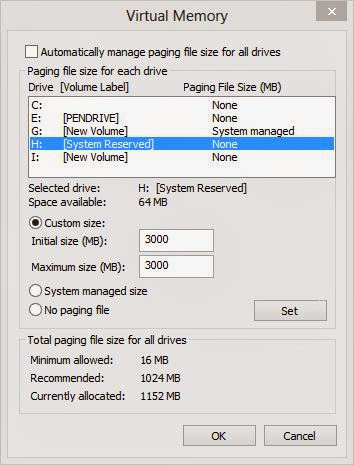
By Default in Windows the virtual memory is located in C drive but u can extent it another drives by right click on my computer >> properties >> advanced settings >> Advanced tab >> settings>> change
choose you hard drive portions one by one and allocate them with some say 1and half size of your RAM size. It is recommended that use an external hard disk if you have one.
defragment your hard disk
There is an inbulit application for this one on windows but if you don't like it you can just download one from internet. Shedule them to defragment weekly. please note that if you over do this you are going to have serious problems with your PC.
Desktop Icons
Each shortcut on yout desk top consumes about 500 bytes of memory so use reduce the no of icons on Desktop save RAM.
SKIN PACKS
If you are using a PC with less RAM then don't install an any kind of Skinpacks. just use your OS in the way it looks.
Anti Virus
Get a good antivirus software for your PC and keep it updated. If you are using your computer without any anti virus software your will get attacked by some spyware.
please comment if you have any trick of your own on this topic.
defragment your hard disk
There is an inbulit application for this one on windows but if you don't like it you can just download one from internet. Shedule them to defragment weekly. please note that if you over do this you are going to have serious problems with your PC.
Desktop Icons
Each shortcut on yout desk top consumes about 500 bytes of memory so use reduce the no of icons on Desktop save RAM.
SKIN PACKS
If you are using a PC with less RAM then don't install an any kind of Skinpacks. just use your OS in the way it looks.
Anti Virus
Get a good antivirus software for your PC and keep it updated. If you are using your computer without any anti virus software your will get attacked by some spyware.
please comment if you have any trick of your own on this topic.

Thursday, 17 October 2013
Windows 8.1 UPDATE
No comments
:
Labels:
microsoft
,
PC
,
windows 8.1
 Windows launched there next OS or update for windows 8 . The new OS has a Start button like all other older versions of Windows OS. Windows introduced it's tiled OS Windows 8 due to the growing popularity of tablet computers. The sales of laptops and PC was decreasing like hell in the last two years and if the calculations are correct the steady decline in sales will continue in 2014.Well, let's get to the point the tiles can be
 arranged in four different sizes this time .Let' take a look at it;s features one by one.
Start button

Windows replaced it's Old start button in windows 8. The feature has been around from Windows 95 . When you click at the Start button the tiled interface comes up and double click it to get the settings which were available in the lower left corner of the Windows 8.
New Tiled Interface

The tiles in windows 8.1 can be arranged to 4 different sizes the smaller ones resemble the small ones in Windows phone , the medium sized ones, the large ones and there is X large which is big as 4 medium tiles ( Desktop tile in the above picture) . Then you can customize the Tile background in many ways (picture ) you can even try out some shades in the in the Tile backgrounds color. Then the best part is you can set it to match the Desktop Background. There is also all apps section that showcases all the installed apps ( This feature was there in Windows 8).
Multitasking
_3.png)

Store


The Home of store gets updated The home page show New+Rising apps and pick for you based on the Download history.If you swipe down from the top you will categories of apps.

Overview
The Music,photos apps also get some modifications and Microsoft promoted skydrive too much this time they even placed a bookmark for skydrive on the explorer. You will get it for free if you are running on Windows 8 (from the store you can download it for free)that's the best part of it. The following picture shows what changes 8.1 Got from 8.

Subscribe to:
Posts
(
Atom
)