
Showing posts with label tips. Show all posts
Showing posts with label tips. Show all posts
Thursday, 31 October 2013
Boost the perfomance of your PC
No comments
:
Labels:
PC
,
tips
,
tricks
,
windows
,
windows 8.1
 If your are using a PC there is a high probability that your PC is suffering from some kind of performance trouble. The performance of your pc can be boosted by using some simple tricks and Softwares without effecting your OS. All the tricks below are 100 % working and will make sure
 your PC will stay alive even if you are running on 1 GB RAM.
Ccleaner
 Download it from here . The software is used to remove all the unused files from you system allowing your pc to run faster . It also deletes all of your online activity records such as history .You can also use it to customize start up programs on your computer .From the Tools options go to startup and disable all the programs that you don't use much often. Make sure you don't disable important ones like your antivirus. This action will prevent you from wasting too much RAM on background process.
Virtual memory
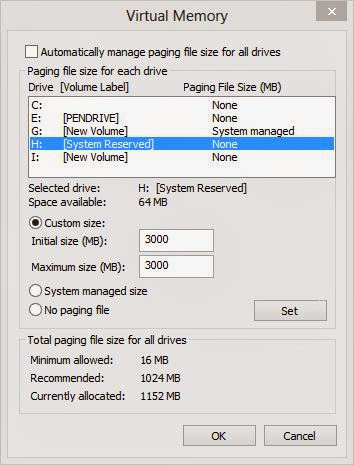
let me explain what is Virtual memory, Imagine a situation you are running a PC with 256 MB RAM.You want to run a video clip of size 500 MB . After filling up your RAM your computer stores it in a Virtual RAM in Hard disk and after execution of the loaded part the rest of the program is shifted from Hard disk to physical memory.
By Default in Windows the virtual memory is located in C drive but u can extent it another drives by right click on my computer >> properties >> advanced settings >> Advanced tab >> settings>> change
choose you hard drive portions one by one and allocate them with some say 1and half size of your RAM size. It is recommended that use an external hard disk if you have one.
defragment your hard disk
There is an inbulit application for this one on windows but if you don't like it you can just download one from internet. Shedule them to defragment weekly. please note that if you over do this you are going to have serious problems with your PC.
Desktop Icons
Each shortcut on yout desk top consumes about 500 bytes of memory so use reduce the no of icons on Desktop save RAM.
SKIN PACKS
If you are using a PC with less RAM then don't install an any kind of Skinpacks. just use your OS in the way it looks.
Anti Virus
Get a good antivirus software for your PC and keep it updated. If you are using your computer without any anti virus software your will get attacked by some spyware.
please comment if you have any trick of your own on this topic.
defragment your hard disk
There is an inbulit application for this one on windows but if you don't like it you can just download one from internet. Shedule them to defragment weekly. please note that if you over do this you are going to have serious problems with your PC.
Desktop Icons
Each shortcut on yout desk top consumes about 500 bytes of memory so use reduce the no of icons on Desktop save RAM.
SKIN PACKS
If you are using a PC with less RAM then don't install an any kind of Skinpacks. just use your OS in the way it looks.
Anti Virus
Get a good antivirus software for your PC and keep it updated. If you are using your computer without any anti virus software your will get attacked by some spyware.
please comment if you have any trick of your own on this topic.

Saturday, 26 October 2013
Essential Play Store Apps to Speed Up Your Android Phone

Android Devices are now Everywhere. There are series of android devices that ranges from low end to high end. But no matter what all of these Devices can be haunted by Lagging. We can see all of these devices lagging and you says "Its Just Happens!!".
Everyone, form Gamers to Programmers hate lagging. Most of us cannot predict the cause of lagging. It may or may not be because of the user. Everyone wants to keep their phones smooth and healthy.
So here are some Apps and Tips in order to make your Android device healthier than ever.
First let us discuss some tips for improving the performance of your android device.
1.Update the OS
The updates fix some lag, bug, and other issues that you may not be aware of. Such issues crop up with reasonable frequency, so updating regularly will ensure the best performance for your phone.
2.Check internal memory spaces
Mainly the cause of most of the lagging is the low free space in device memory. Check your device memory and clean it up by removing unused apps and other things..
3.Root the phone
Rooting gives you additional options to do with your phone. You can enable several features and they can be used for more performance for your phone. After you root the device , you can
- Overclocking your phone's processor
- Install a custom ROM
- Delete unwanted pre-installed applications
- DO NOT delete any system application
4.Restart the phone
It is a temporary option. But in most of the situation it actually works...
5.Reset your Android phone
This resets your phone and bring back the factory settings. This also deletes all the apps you previously installed. This makes your device faster. Don't forget to backup your phone before resetting.
For some devices the lag actually remains even after these steps are done. Or if you do not want to restore or root your device you can use some apps to improve the performance of your device. So here are some Apps that are found in Google Play Store that might help your Android Device.

Here Some Apps For Your Android Device
1.Automatic Task Killer
Kills chosen applications every 'n' seconds or minutes. This frees up some RAM memory, thus the phone will run faster.
2.A Good Antivirus
Malwares and Viruses can be the cause of lag. Antivirus Scans your phone for any possible viruses and malwares and removes them. These usually slow down your phone. Once you removes all the viruses, you can bring back the older performance. Make sure you get a good Antivirus.
3.Start up manager
Allows you to stop number of applications from starting up automatically when the phone boots up.
4.Juice defender Application
Gives your phone more battery juice by stopping services and applications.
5.Cache cleaner Application
Cleans up some cache from the mobile's memory.
6.Apps to SD card Application
Allows you to move some applications to the SD card (if you have one inserted). This also speeds up the phone.
7.Spare parts Application
Gives you some more settings to configure in your phone, such as a faster window and transition animation.
Friday, 25 October 2013
Greatest Facebook Tricks Of All times
No comments
:
Labels:
facebook
,
tips
,
tricks
 Facebook is a popular social networking site with some amazing features that makes it unique. The features of Facebook is so unique that you will become addicted to it after using it for two minutes. There are over 1.2 billion active users on Facebook and they use Facebook for different purposes like connecting with friends, promoting there business etc... This is our second post about Facebook the first one was helping you in Seeing all the profile pictures of all active members of Facebook. In this post We are going to discuss some cool stuffs like making your own sticker,
turning off chat to custom people and how to convert your Facebook account to a fan page.
So, let's get it started .
How to make custom stickers
Facebook introduced the concepts of stickers first in chat app and now it is available in desktop too. but the no of sticker packs available are limited . you might have noticed some of your friends sending you stickers that are not part of sticker packs, Let me explain how it is done Click here upload the image from which you want to make a Sticker . Wait for some and you will be provided with a code just copy and paste it on your chat box.
How to convert your profile to a fan page
If you want a fan page with 5000 friends when it is started just create a account and add 5000friends then click here to convert it into a fan page .


Scheduling Status updates
If you are having a page you might be familiar with Scheduling posts on Your page and wondered why can't I do it in my profile . now, using an cool app called Later Bro you can schedule status updates for your Facebook account . All you have to do is provide your Status and time in which the post have to be posted and you know the rest.

Who has turned off chat for you
It is simple use Online now app and it will show all of your friends who are online irrespective of the people who are turned off chat or not.


Change Facebook Themes
tired of the blue theme of Facebook use this Firefox extension to change the theme of Facebook timeline and you can use this Site to create new themes .
Create fake Facebook wall posts

GET MORE LIKES ON YOUR STATUS AND PICTURES
Go to likelo.com login, follow the instructions, install the likelo widget submit the posts for which you want to get more likes. Login to Facebook..

TURN OFF CHAT FOR CUSTOM FRIENDS
From the advanced chat settings select turn on chat for only some friends and gave the names of friends to whom you want to turn on chat..

Find out who unfriended you
Using the following Chrome extension you can find out who unfriended you. when somebody unfriends you on Facebook you will get a notification.
If you are not using Facebook via chrome use this site which will help you in finding who all unfriended/ blocked you.
If you are not using Facebook via chrome use this site which will help you in finding who all unfriended/ blocked you.
Schedule Facebook message

I hope you liked and will use it in future. Also check
Monday, 14 October 2013
Increase Your alexa and Google Page Rank
 According to webmasters there are 200 + factors according to which the Google Index your webpage in search results . I already wrote a post to give tips on how to write good post and manage your Blog (SEO AND BLOGING TIPS). Google page rank and Alexa rank are the two important factors in it.
In this post we will focus on Tips to increase them .
Alexa rank
Alexa's system count only the traffic which is having a alexa toolbar installed on there browser . You can't force everyone to install a alexa toolbar but you can install a alexa widget on your blog, making every person visiting your Blog count. Click Here To get alexa widget for your Blog.
- You will have high alexa rank if you are having a tech blog.Since,most of your visitors are techy guys having alexa toolbar installed.
- In any of the posts give a Link back to the Alexa
- Share your posts on Facebook,Google + , Twitter etc these will bring a huge traffic to your blog and increase your alexa Rank.
- Alexa bot's count the No of Backlinks in your blog too.
- OR Use alexa boostup website to increase it in a day.
Google Page Rank
This is more important than alexa rank. Google check's the no of backlinks , internal links, content, loading time of page etc . As i was saying it is not the only factor it is among the 200 + factors a page can top on Google results even without having a good page rank. Usally page ranks are updated in every 2-3 months. ( Check Your Page Rank)
- The only way to get good page rank is get maximum Backlinks and post good quality content.
Post your opinions and suggestions as comments
Friday, 11 October 2013
SEO AND BLOGING TIPS
 After starting a blog the first thing you heard may be SEO optimization. If you are reading it you are a beginner for sure so i am covering topics from base. Google use some factors to index the search results why ? because if they don't provide there visitors with good quality stuff they will switch from Google to Bing or yahoo and there income will become low and people
 will start saying just yahoo it. Google usually update there algorithm in every few months but we can spot some factors that kept constant by Google.
Content is the king
post good quality posts. I already told you Google want top quality content on there search results so that people will continue using Google and the other advantage is that if people liked your blog content they will come back again to see the new updates in your blog ( hope all of u are going to visit us again ).Another thing is keep your blog updated on a regular basics and all the posts should be of good length Google bots will thing it is covering more topics. Don't copy from other sites it may result in losing of your adsense account.
Design and layout
Always keep it simple, The layout should be user friendly, use a search bar,labels etc on the Blogsome important layout /Design characteristics are given as bullets you will understand why i gave them in bullets as soon as you read the first one.
- Use bullets and numbered lists on your posts more frequently .
- Try to give captions to your image because they tell a great deal about your blog to Google.
- Use more multimedia contents like pictures, videos etc
- Give Good tittles to your posts
- use more subheadings
- highlight some of the important contents in your post
- Keep lot of pages like mobile, tips, pc
Try to keep your blogs design simple because Google considers the Loading time of pages as an important factor.
LINKS / URLS
- Try to link to other posts in your blog like ,Now i an writing a post on topic SEO i can link this to other posts in my page using a Link like this why because Google bots likes this.
- BACKLINKS have been a hot topic in the field of topic, people even made softwares that automatically produce backlinks for there Blogs. Sometimes backlinks can be the reason for loseing your page rank ,why? imagine a situation you are running a tech blog and your friend has a blog that provide movie reviews and both of you decided to give backlinks to your page from his blog then Google will consider your blog as a blog showing movie and tech reviews.
- Use customized links for your posts instead of the default links
- Having too many broken links indicate outdated blogs so avoid it.
SOCIAL NETWORKS
- Keep a Facebook fan page for your website and gave a like button for your page. to give a like button copy the below code and paste it on html/java script gadget .
<iframe src="//www.facebook.com/plugins/likebox.php?href=http://www.facebook.com/smarttechz&width=300&height=248&colorscheme=light&show_faces=true&border_color&stream=false&header=false&" style="border:none; overflow:hidden; width:248px; height:310px;" ></iframe>
Replace our username with your user name and you can adjust the height and width of the frame
- Use your Google + account to share the links and keep an followers / +1 gadget on the side bar
If you are a beginner then these social networking sites will be the best traffic source for you.
TIPS
- Keep a labels Gadget on your blog and tag some Labels on your posts
- Use a related post Gadget for your blog .
You need a lot patience to be a good blogger, even search engines prefer older urls in top of there list. so follow this steps and you can become a successful blogger in months
Subscribe to:
Posts
(
Atom
)